

 1

Buy X get Y on Shopify: remind shoppers to add the free item
Use on-site messages to tell shoppers about a Buy X get Y offer and remind them to add the free item before checkout.


A buy X get Y offer only works if the shopper actually puts the Y item in the cart. Shopify's Buy X get Y discount never adds the free or discounted item for them, so a shopper can buy two bags of coffee, miss the free mug, and leave thinking the deal was broken.
This guide shows how to close that gap with on-site messages. You will announce the offer before shoppers reach the cart, remind them in the cart while the free item is still missing, and, on the Scale plan, let them add it from the message itself.
To set up the discount itself, see Shopify automatic discount vs discount code.
Why the free item gets missed
With an automatic Buy X get Y discount, Shopify prices the "get" item once it is in the cart alongside the qualifying items. With a discount code, the shopper also has to enter the code at checkout, so this guide assumes an automatic discount. Until then, nothing on the page tells the shopper what to do.
The fix is a message at each moment the shopper decides:
- Before the cart: what the offer is and exactly which item they need to add.
- In the cart, while the item is missing: a short reminder with a way to add it.
- Once the item is in: nothing at all.
Announce the offer in the feed
Start with a NotiFeed message in the bell feed in your store header. NotiFeed is on every plan, including the free Starter plan. Write the offer as an instruction that covers both halves of the deal.
A sample message:
Buy 2 bags, get a mug free. Add any 2 bags of coffee, then add the Morning mug. It comes off at checkout. Ends Sunday night.
Point the Call to action button at the coffee collection, with button text such as "Shop coffee". A click to a collection page starts revenue tracking: products added within 6 hours count if the shopper checks out in the same browser within 30 days.
On Scale or Enterprise+, set a start and end on the campaign's Schedule tab so the announcement stops when the Shopify discount stops. On Starter (Free), pause it yourself when the offer ends.
Remind shoppers in the cart while the free item is missing
The reminder should only reach shoppers who have not claimed the item yet. Targeting rules do this on every plan. On the Setup tab, switch on Target visitors based on, choose all conditions, and add rules from the rule list.
For the coffee and mug offer, the rules look like this:
- Cart products Includes any: your coffee bags.
- Cart products Does not include any: the Morning mug.
- Cart items Is greater than or equal to 2, if you want the reminder to wait until the cart holds at least two items. Leave this rule out to show it from the first bag.
Atomato checks the cart on each page load and cart change, showing the message while the cart matches and removing it once the mug is added. With some themes, a cart change only counts from the next page load.
You can deliver this reminder as a NotiPop, which appears over the page as soon as the cart matches, or, on Scale or Enterprise+, as a second message in the feed campaign. A NotiPop hides itself after 8 seconds by default and then does not show again in that browser, so set Hide after to ∞ for this reminder. Once a shopper closes it, it stays closed. On Starter (Free) you can run one NotiFeed and one NotiPop campaign at a time, one message each, so the feed announcement plus a NotiPop reminder fits the free plan. Give the NotiPop a button that links to the mug's product page.
Let shoppers add the free item from the message
On Scale or Enterprise+, a NotiSell message removes the extra step. It shows products in the feed with an add to cart button, so the shopper can add the mug without searching for it.
Set it up like this:
- Create a NotiSell campaign, choose the Manual method, pick the mug and keep only the variant the discount covers.
- Write a Title such as "Your free mug is waiting" and a Description saying it comes off at checkout with two bags, since the feed shows its normal price.
- Set the Button text to "Add my free mug" and keep Add product to the cart ticked. The button adds one unit of the chosen variant, then opens the cart page.
- Leave Offer incentive off. Your Shopify Buy X get Y discount already prices the mug, and a second discount on the same item is one more combination to test.
- Add the same rules as the reminder, Cart products and Cart items Is greater than or equal to 2, so the message waits for two items and leaves the feed once the mug is in the cart.
A worked example: before and after
Before: an announcement bar says "Buy 2, get a mug free". A shopper adds two bags, sees no mug in the cart, and assumes the offer did not apply.
After: the same shopper opens the bell and reads that they need to add the mug themselves. After adding the second bag, when they open the bell again, the feed shows "Your free mug is waiting" with an Add my free mug button. One click adds the mug and opens the cart. The reminder disappears because the cart now includes the mug.
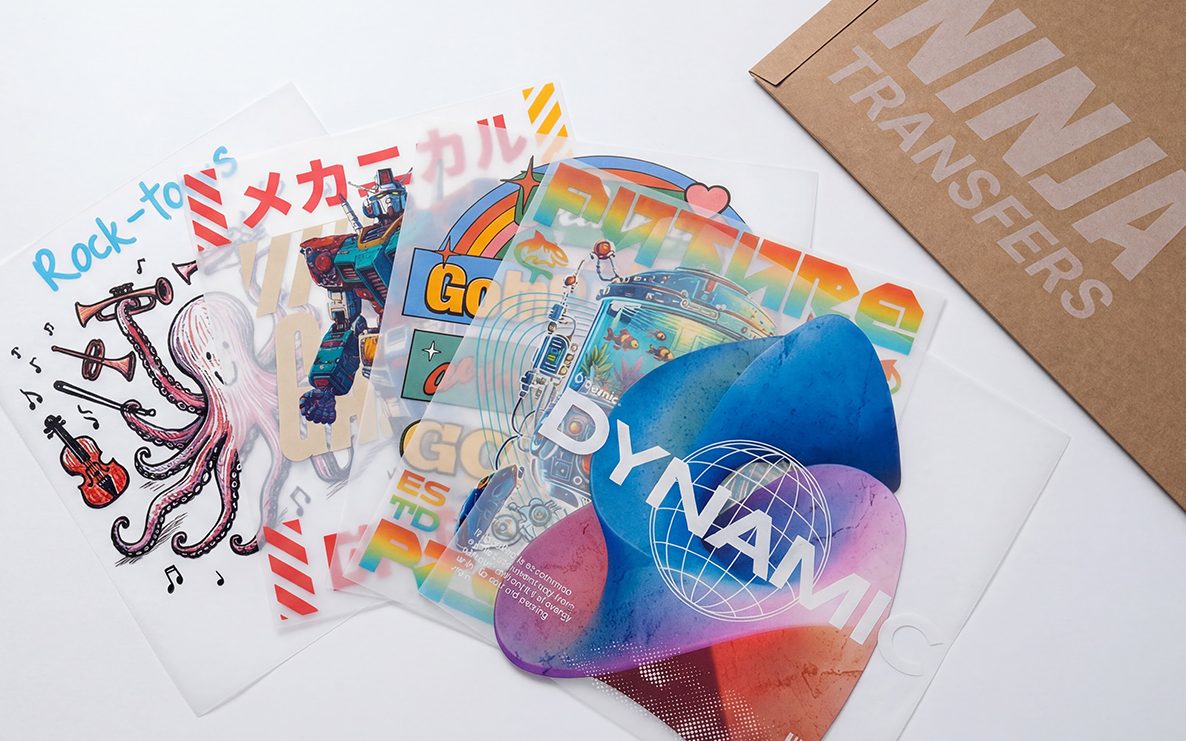
Ninja Transfers shows how much a single offer message can carry. Its best single campaign, "Buy 5 Blanks, Get 5 FREE Transfers", was credited with $24,162 of attributed revenue between 19 April and 15 October 2026, out of $99,329 across all its feed campaigns. Those are account totals from NotiFeed only, not a controlled test. The Ninja Transfers case study has the details.
What this does not do
- It does not add the free item automatically. The shopper still clicks to add it. A NotiSell button adds one variant at quantity 1, so a "get 5 free" offer still needs the shopper to set the quantity in the cart.
- It does not check quantities of one product. Cart products checks whether a product is in the cart, not how many. Cart items counts the total quantity of everything in the cart.
- It does not create the discount. That stays in Shopify, with its own dates.
- It does not show on checkout or the thank-you page. Messages run on your storefront pages only.
- The free item earns no revenue credit. Atomato counts the checkout price of matched items, so a free mug adds nothing. Bags added after a click count toward that message, unless a later click on another message, such as the NotiSell button, takes over.
For more ways to use cart rules, see targeting on-site messages by products in the cart and the help article on cart-aware messages.
Test it before the offer goes live
The Store preview ignores the rules of the campaign you are editing, so it shows the look only. Save the campaign as Active and open your store in a private window. Add two bags, watch the reminder appear, add the mug, and check it goes away and the mug is free at checkout.
For a larger holiday calendar, the guide to planning BFCM on-site messages covers how to keep cart messages from competing.
Next step
Write the feed announcement as an instruction, then add one cart reminder with a Cart products rule that includes the qualifying product and excludes the free one. On Scale, swap the reminder for a NotiSell button so shoppers can add the free item in one click.

Keep reading
Read next




Ready to show the right message to the right shopper?
Start showing targeted on-site messages without changing your marketing setup. Atomato works alongside the popup, email and SMS tools you already use.
Five-minute setup. No theme code or developer needed.